最妙的是,Google的收入,包括 Youtube 的廣告、 Google map location based advertising, 以及 流動搜尋廣告等,會隨著 Android 的普及而不斷上升,造成良性循環。Google 強勁的收入,可以支持Android 不停發展。
(Google 的廣告平台,獨步天下,他家無法競爭,將另文再書)
MS + Intel 只有平台壟斷, Apple 只有設計和 媒體 Bundle, 而 Google 卻有齊平台壟斷(search+ Android), 設計 (由旗下 Vendor 各施各法),免費(Open license), 內容 (Gmail, Youtube , Google Map based data, 以後的 Google library等) 四大特點,而覆蓋的用戶更廣 (由商業、高端到低端可以一手包辦)。
When Google announced the Chrome operating system back in July, they didn’t give out very many details on what to expect from it. Since Google open-sourced Chrome OS late last week, developers can now compile the operating system from source and try it out for themselves.
Google Chrome OS uses a Linux base, which then loads the Google Chrome web browser (which has been available for Windows since last year). That means that the Google Chrome web browser is basically your operating system. And despite speculation, Google Chrome OS has no relation to Android, Google’s operating system for mobile devices.
Along with last week’s announcement, Google also released two videos detailing the purpose of Google Chrome OS. The two videos are shown below.
If you’re interested in trying out Google Chrome OS and don’t know how to compile it from source, you can download a VMware virtual machine image here (registration is required, unfortunately). Of course, to run the VMware image you’ll need to download/buy a virtualization program if you don’t already have one to run it in. Both VirtualBox and VMware Player support the image and can both be downloaded free of charge.
You most likely won’t be seeing Google Chrome OS pre-installed on any computers for about a year. Google Chrome OS is meant for netbooks and will require a solid state drive (flash-memory based hard drive) to run. Because of this, there most likely won’t be a threat to Windows on desktops, laptops, and netbooks with actual hard drives.
This work is licensed under a Creative Commons Attribution-Noncommercial-Share Alike 3.0 United States License.
This is a (hopefully) easy guide for those who may not know exactly what to do and some features of this app require root permissions so you have to have root access to learn how to root please see my other posts.
Start Up:
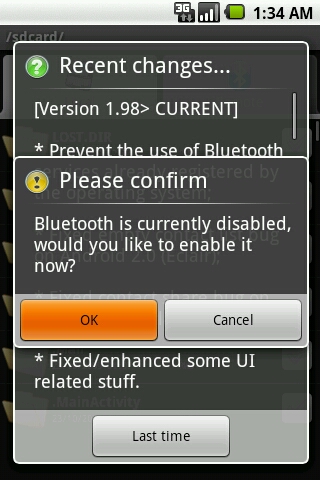
Upon opening you may get two pop-ups depending on your use of this application and bluetooth settings.
These pop-ups are
- Ask to enable bluetooth (if not already enabled)
- Application change log (shows 3 times per update)
If you want to send or receive files via bluetooth you will need to click OK or click cancel if you only want to use BlueFTP as a stand-alone file manager.
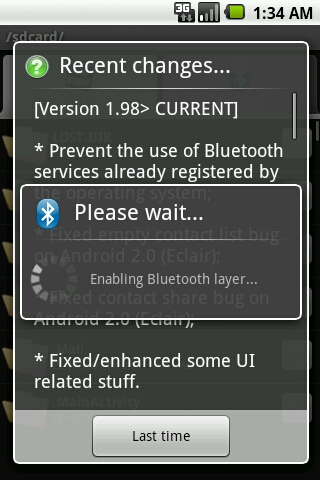
Once you clicked that it will display a message saying enabling bluetooth layer wait for this message to disappear and the change log will then show once you have read that click the button below the writing (it may not say last time like seen in the screenshot below).
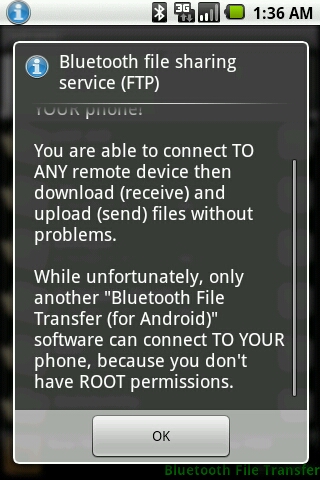
Once bluetooth is enabled you will get one of two screens depending on if you have root access or not.
If you dont have root you will get the following message
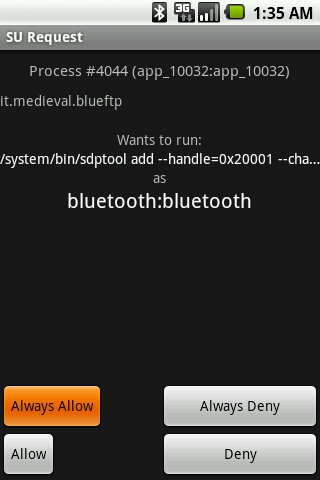
If you have root access you won’t get that message above instead you will get a few of these
These are call SU Permissions and will enable you to send and receive files and as i said above you will get about 2 or 3.
I recommend clicking always allow to prevent having to do it on every start-up.
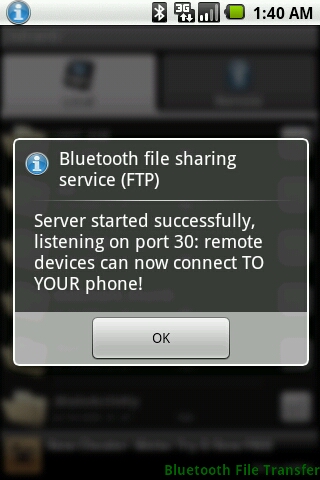
Once your passed those pop-ups you will see an icon in the notification bar of your device which tells you bluetooth is enabled and ready to be used.
You have now completed the Start-Up process.
Settings:
I will now explain what the settings mean.
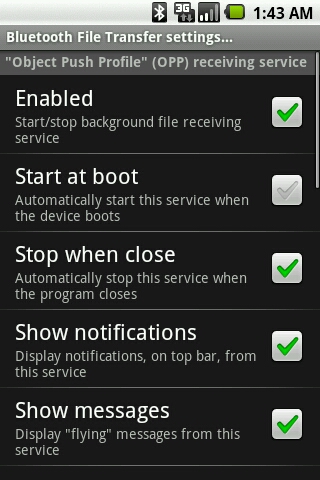
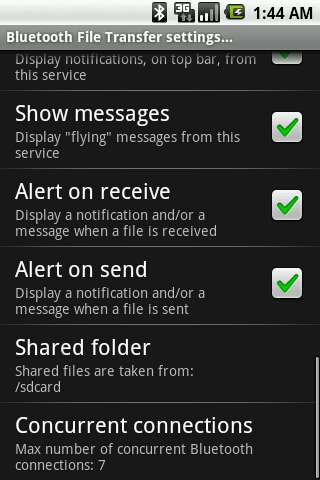
To access these press menu and click more and select settings you will then see the following
Object Push Profile (OPP for short) is the settings for receiving files here is what the ones above mean.
Enabled – This means it’s all set and ready to receive files.
Start at boot – This means if you turn off your device when you switch it on again BlueFTP will start automatically.
Stop when close – This means when you close BlueFTP it will shut off receiving of files.
Show notifications – This will display messages inside your notification bar to let you know when a file is received.
Show messages – This will display “flying” messages to let you know when a file is received.
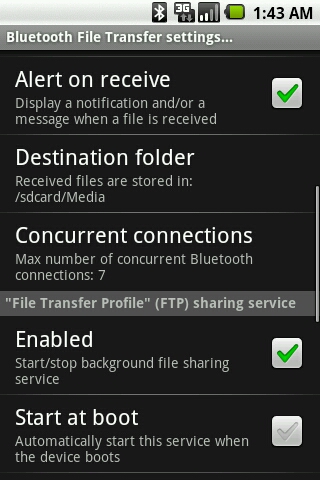
See next screenshot for more
Alert on receive – This will display directly on the screen to let you know when a file is received.
Destination folder – This is where you define where you want the received files to be saved to.
Concurrent connections – This is where you choose how many devices can send you stuff at the same time (max 7)
I will discuss the rest after the next screenshot
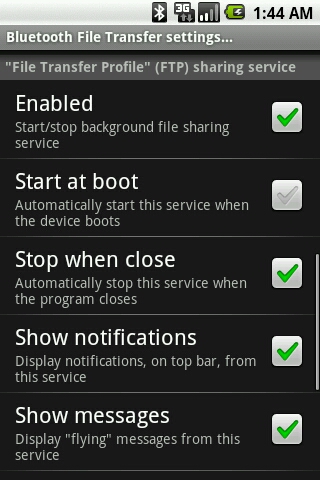
File Transfer Profile (FTP for short) is the settings for sending files here is what the ones above mean.
Enabled – This means it’s all set and ready to send files.
Start at boot – This means if you turn off your device when you switch it on again BlueFTP will start automatically.
Stop when close – This means when you close BlueFTP it will shut off sending of files.
Show notifications – This will display messages inside your notification bar to let you know when a file is sent.
Show messages – This will display “flying” messages to let you know when a file is sent.
See next screenshot for more
Alert on receive – This will display directly on the screen to let you know when a file is received.
Alert on send – This will display directly on the screen to let you know when a file is sent.
Shared folder – This is where you define where you want the files you wish to share to come from.
Concurrent connections – This is where you choose how many devices you can send stuff to at the same time (max 7)
Sending:
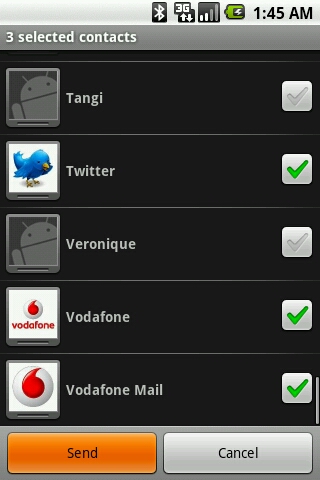
Here is what the contact sending looks like
Just mark the contacts you wish to send and the following screen will show
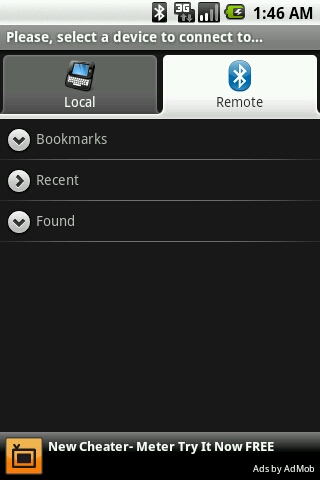
This is where you either choose the device you want to send to or search for a new device (more info below)
I’m now going to explain how to send files by bluetooth, this method works for any files you wish to send.
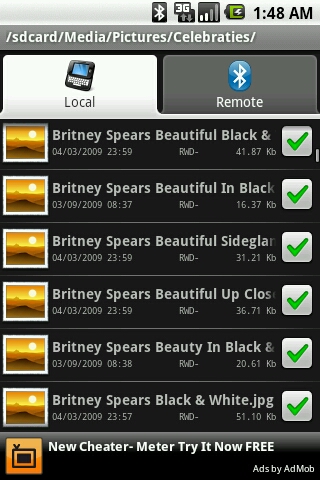
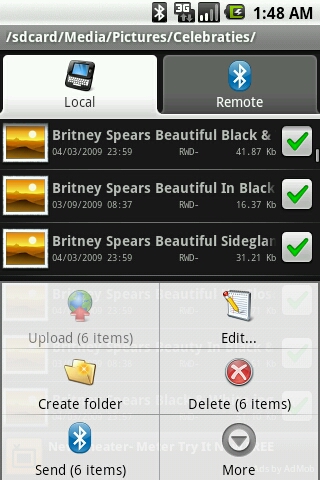
First locate the folder with the file/s you wish to send and click the box/es of the file/s you wish to send so it will look like this
Once you have selected the files click menu and the screen should now look like this
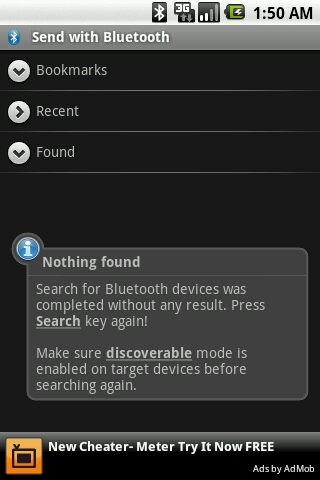
Select send (it will display how many items you wish to send for example 6 items) and you will now get a screen like this
It will automatically search for new devices in your area (normally only effective as far as an average sized bedroom so ensure the user is close when trying to connect )
If you can’t find your friends device ensure they have a bluetooth capable handset and that there bluetooth is enabled on their device (refer to phone user manual of your friends device or contact their service provider with your friend’s phone make and model for more info).
Remember BlueFTP doesn’t give the device you’re sending to bluetooth.
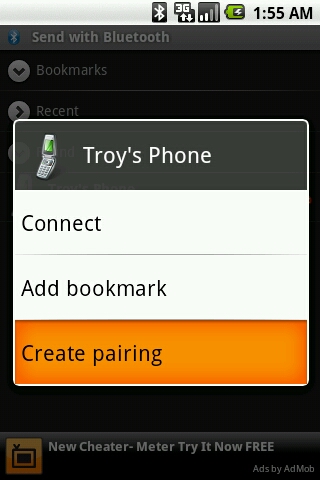
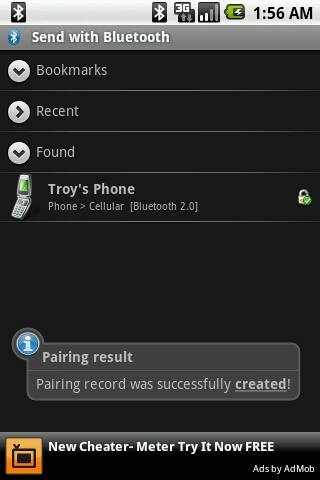
Once you have located the device your after on your Android device long click it and select “Create pairing”
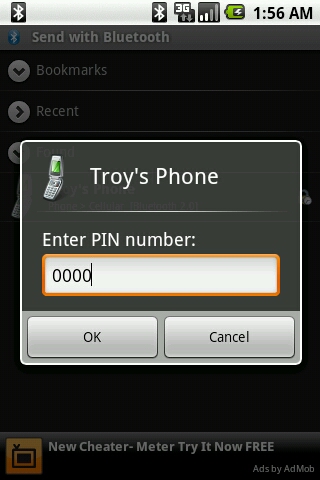
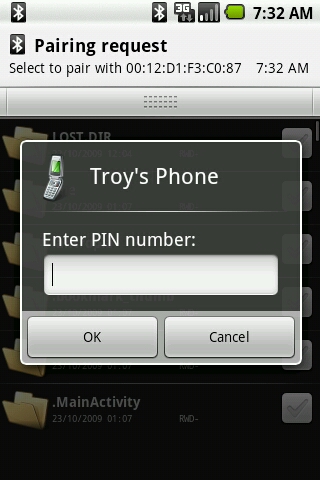
You should then get the following message on-screen
Enter the password to which the other device your connected to will have to input.
It can be any password you want I use 0000 as its easy to remember for the other user.
Once you have the password click OK
Tell your friend using the other device you’re sending to the password and a they should get a pop-up asking to input password.
This is where they enter the password you choose.
Once they done that you will get the following message on-screen
This is alerting you that the pairing has been successful and you are ready to send.
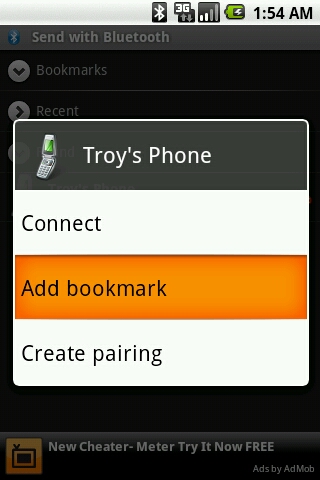
Before sending however if you think you will send the friend your currently sending content too at a later date I recommend adding the user as a bookmark by long clicking on your friend’s phone on your device.
It should come up like this
Select Add bookmark and this will save the device for future sharing/receiving.
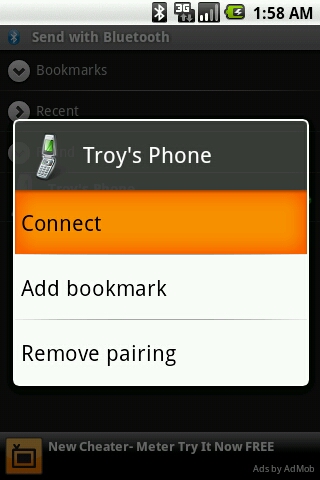
You may now connect to the device by long clicking your friends device on your screen until the following appears
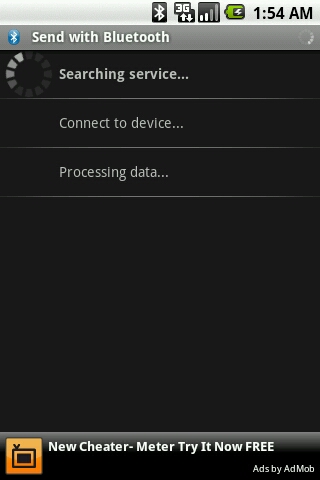
Select Connect and this should now show
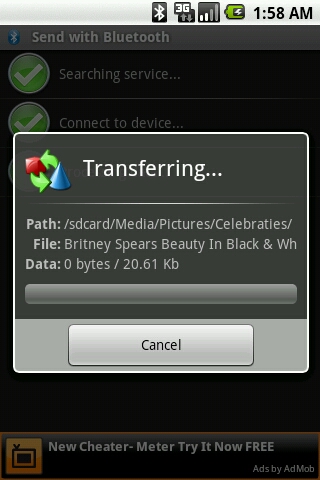
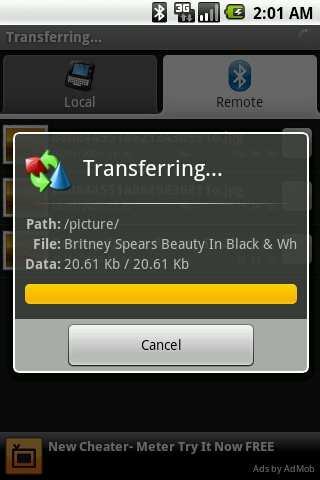
Wait till this completes and it should automatically start send the files you marked above and the screen will look something like this
Wait for that to compete and if sending multiple files the screen above will display each file one at a time not all at once so wait for a message saying sending complete or something like that.
Congratulations you have now passed steps to sending files via BlueFTP.
Let’s talk about receiving now and then exiting before we complete the guide.
Receiving:
So you want to receive a file from a friend.
Firstly make sure your device can handle the file your friend is sending you.
- Ensure you have enough free space on your device.
- Ensure the file is compatible with your device e.g a MP3 track and not a theme for a Sony Ericsson (it will not work on your device).
- Ensure you friend has bluetooth on their device and its enabled (refer to phone user manual of your friends device or contact their service provider with your friend’s phone make and model for more info).
Unless already paired previously with the device you want to receive a file from, you will get the following
This is where you enter the code your friend has chosen (so ask your friend what the password they put in was).
Once you’ve input the correct password you will get the following Pop-Up
This means you are receiving the file so wait for this to complete before doing anything.
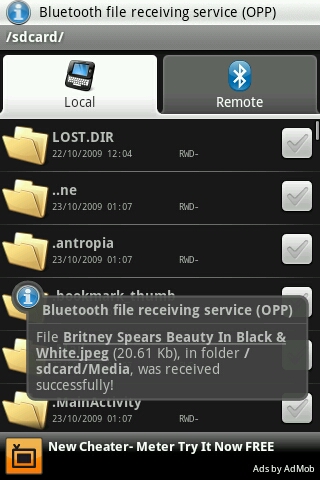
If you got notifications and/or alert on receive enabled via BlueFTP settings you will get something like the following
This is all you need to do to receive a file.
Exiting:
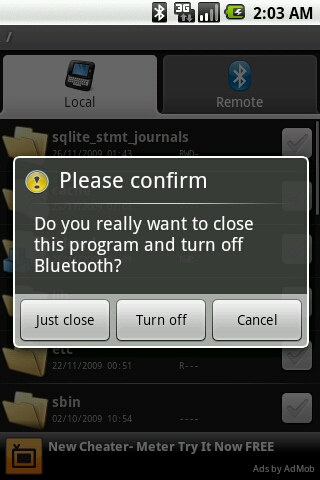
Last step is basic and that is exiting the application.
It’s simple, all you do is press your back key on your device until you get something like the following
Select the appropriate option for you and then your complete.
This concludes the beginners guide to BlueFTP.
Please give the developers a break and read this fully before e-mailing them with issues as it may not be BlueFTP’s fault.
I’m also will to assist you should you have a issue so leave a comment below.
The latest QuickConnectFamily beta, 1.6 beta5, includes Xcode templates for iPhone, Android, and Palm WebOS development. The file structure is the same across all of the platforms. You can write your application in HTML, CSS, and JavaScript for one device and then move the code into projects for the other platforms.
Coming soon, one project that builds and launches on all platforms.
Things to remember
The 1.6 beta 5 dowload includes the full Android SDK
You have to install the Palm WebOS SDK if you want to develop for that platform
The Android and Palm versions don’t yet have all of the functionality of the iPhone version. They are most definitely beta at this time
Here are images of the same simple application running on all of the platforms on my MacBook Pro
One could argue that the Motorola Droid is in fact the first-ever Android-based in-car navigation solution, but we’re surmising that ArcherMind would disagree. Over at the Embedded Technology 2009 trade show in Yokohama, the outfit has demonstrated an Android-laden navigation system that could actually be inserted as a factory option; curiously enough, it looks an awful lot like the AutoLinQ initiative that hit our radar back in June. The outfit is reportedly shopping the system — which includes a 7-inch, 800 x 480 display — to a variety of Chinese automakers, and given that it can browse the web via WiFi or 3G, connect with music players and phones over Bluetooth and even play back audio files stored on the HDD or SD slot, we can’t imagine it being a tough sell.
Llevo mucho sin escribir porque, como dije, tenía la necesidad de crear algo nuevo y creedme que lo he intentado.
Las cosas no son fáciles y es de entender que un proyecto como el que propuse sea algo difícil de llevar a cabo. No se trata de que sea una tortura, yo creo que se trata deque hagamos una web entre amigos/compañeros de fatigas.
Unamos nuestros esfuerzos, no?
Los motivos? ya los sabeis pero como es la última oportunidad que le voy a dar al proyecto pues los vuelvo a explicar:
- Los post duplicados: este un motivo para mi principal y es que en todas las webs que leo sobre Archlinux o lo que sea, me encuentro las mismas noticias.
- El trabajo es voluntario y gratificante: Es cierto que los que escriben lo hacen voluntariamente pero, queramos o no, hemos adquiridos un cuerdo tácito en el que nos comprometemos a continuar escribiendo para que alguien se beneficie de los datos que aportamos.
Aseguro, en mi caso, que nada es más gratificante que recibir un comentario a un escrito.
- Devolver a la comunidad: sigo pensando que en los años que llevo en esto (y podría sumar los que llevo con la informática en general) siempre he ido consumiendo lo que la Gran Comunidad de Internet me ha aportado pero rara vez he contribuido.
He mirado valoración de películas, música o libros, he solucionado mis problemas con el ordenador o la lavadora, hasta he encontrado consejos de toda índole pero rara vez he puesto un comentario dando las gracias, felicitando por el aporte, corrigiendo si había algún error o simlemente opinando sobre una película y… la verdad… me siento mal.
A veces cuesta hasta dar las gracias... pfff!
Creo que la gran mayoría hemos sido como yo en algún momento y, algunos han encontrado el camino de devolver el favor, pero yo, estoy en ello.
Este proyecto nace con la idea de contribuir a la comunidad de Linux en general, pero también de tecnología. No quiero cerrarme a nada, sólamente quiero crear un proyecto conjunto, con amigos y compañeros, con gente con ganas y compromiso. Está claro que todos tenemos cosas que hacer y que organizar algo así lleva mucho tiempo y es difícil pero, como me ha enseñado la programación (y el socio con el que la hice!), no hay cosas difíciles, hay más de una cosa junta. Sólo hay que desgranar, “divide y vencerás” que decía otro.
Lo que propongo:
El nombre ahora no recuerdo a quien se le ocurrió (puede ser xabz(?)) pero es un poco lo que quiero transmitir. entiendeatux. Ese es nuestro problema y al que podemos poner solución.
Propongo crear una web: www.entiendeatux.es como un clon de www.muycomputer.com pero con la salvedad de los temas que queremos tratar.
Y luego crear subdominios con los siguientes “blogs” administrados por parejas o más dependiendo de las secciones y siempre teniendo en cuenta que los problemas/soluciones/tutoriales iguales entre las distribuciones deberían ir a su subdominio p.ej. instalaciones.entiendeatux.es pues siempre se instalan los mismos paquetes pero con la diferente manera según cada distribución (apt-get, pacman, yum, etc…).
Será que no teemos cosas de que escribir? Y no sólo de Linux vive el hombre tecnología, música de linuxeros (creo que es bastante diferente a la mayoría), artwork, telefonía, competencia, reflexiones… mil temas…
Incluso me atreví a hacer un diseño “mock up” de la web a ver si daba ánimos aunque luego parece o, a lo mejor, se quede en nada. Lo pondré por si a alguien le interesa
No se si le gustará a alguien pero lo hice con ganas y... bueno, eso es todo!
No sé, a lo mejor es demasiado aunque una de las ventajas que creo que ya he dicho es que si lohacemos entre varios y luego lo mntenemos entre varios, nos podemos cubrir cuando alguien no puede/quiere escribir.
Sueño de un lunático? Puede ser pero creo que a matkiber… le hubiera gustado conseguirlo, igual que a mí, pero necesitamos más gente, más recursos, más compromiso y más ganas.
Algún valiente se atreve? XD
Alguien se atreve?
P.D.= Si no lo consigo esta vez… vuelvo al blog y seguiré como hasta ahora… no os librareis de mí tan fácilmente muaaaahahahahaha!
Current statistics of Android phone usage shows huge increase of users. In Flurry Smartphone Industry Pulse, July 2009, Flurry analytics provider reveals this fact. Android market is now seems most promising than ever. Developers are taking various strategies for monetizing the applications including cross-selling, advertisements, paid versions etc.
Everyday Android Market is getting flooded with a huge number of applications. Most of the applications are rich with features. But not all of them get the required attention of users. As a result, some of those elegant applications get obscured. Again, many simple applications get retained by users because of the responsiveness of developers and continuous improvements and updates.
ProTranslate is the first successful application from Prolog, Inc. Since the first release, it has been successful in attracting users because of simplicity and usefulness. We tried to modify and add new features as per user feedback. It’s free. It’s simple and has almost all the features a user can expect from a translator application. Still we are working on phonetic representation for users. To support the continuous development, advertisements from quattrowireless has been integrated.
We always try to fix the issues reported by users which helped the app to retain itself in users’ favorite list. We thank our users for all the supports.
Here are some comments about the application:
Comments and ratings for ProTranslate
by T!M0 the 11/16/2009
Perfecto
by Jennifer the 11/14/2009
Great Translator…I use it at work. Good job!
by Sean the 11/12/2009
Great app but seems to be a little slow when translating a lot of text.
by Gabrielle the 11/11/2009
Uninstalled & ’cause I didn’t have a backup after all. Decided to give it another try and now it works. So I love it again!
by Juan the 11/10/2009
App looks fine and has a huge list of languages but keeps telling me there is a network malfunction even though all other apps work fine.
by Ana the 11/9/2009
Useful little app
by Matt the 11/4/2009
Translates English to Spanish well but translated text msgs contain odd numbers, characters, and letters on Sprint Hero.
by Adam the 11/2/2009
Clunky when compared with Re-Translate, otherwise ok.
by Anthony the 10/26/2009
Great app however I’d love to see translations to spoken languages too (konnichiwa etc)
by Sue the 10/17/2009
Love this feature but I get force close too often please fix.
by jeremy the 10/14/2009
Its great 2 read music in a diffrent language..i use it all the time
by R the 10/13/2009
Very useful, thanks
by Carlos the 10/13/2009
Awesome!
by natz the 10/12/2009
I likes!
by Plurmommy the 10/10/2009
Wish it would speak the other language to you that it translates..
by corlissak the 10/9/2009
Great app but force closes wen i try 2 send an sms. Pls fix!
by EDWARD the 10/9/2009
Great app
by Lennie the 10/7/2009
I use this app ALL THE TIME! Love that you can copy & paste into text, email, whatever. Works great for Spanish. Haven’t tried other languages. Easy!
by Xuan the 9/23/2009
English to vietnamese is not accurate…i typed tear and it translate tear?
Comments and ratings for ProTranslate
by charlene the 8/21/2009
Really Likeing this App
by jennifer the 8/19/2009
English to Vietnamese translation is horrible!
by Claudio the 8/18/2009
Does exactly what it’s says, 5star if you can download the data base.
by Andriy the 8/17/2009
Not working. Network error
by anthony the 8/17/2009
PLEASE, English-japanese, needs written out english option so we know how to pronounce it also. Would become the best trans app if you can do this
by Brad the 8/14/2009
It’s a great app. Use it for friends in Ukraine.
by Elvis the 8/13/2009
Not working any more network error
by Eric the 8/10/2009
Okay gui but useless engine. Not a single test sentence german<>dutch made any sense. I’d prefer a proper dictionary
by Samvel the 8/6/2009
Good very good. Follow SOADofficial @ twitter… system of a down forever!
by Mario the 8/6/2009
If pronunciation was added i’d give it 5 stars.
by DT the 8/6/2009
Very applicable for almost anyone+ 3_5Adonia8_1@twitter
by Mike Bee the 8/5/2009
Very nice. Thank you dev.
by Brian the 8/5/2009
This app is awesome! Go watch Orphan!
by Neal the 8/5/2009
This app is the best of all the translater apps
by kid the 8/5/2009
Much improved since last update
by Richard the 7/30/2009
Very useful but force close alot
by Aundre the 7/30/2009
Near perfect, please add speech! Also, translated sent txt msgs don’t show in sent box on G1. Impossible to hold conversation. Other than that 5 stars
by Azamat the 7/30/2009
очень крутая штука,спасибо
by asif the 7/29/2009
Nice app can you add voice plz
by Guy the 7/27/2009
Very nice
by TAG the 7/27/2009
I dig this! Works like a charm, 5 *****
by James the 7/27/2009
Great update. It does drop lang select if keyboad is opened though but still much better. Thanks dev.
by Darryl the 7/26/2009
Great love that i can txt or email translation!
by Tiana the 7/24/2009
Should b able 2 translate Amharic. Seems like we got all the countries covered except ethiopia lol
by Sharaye’ the 7/19/2009
Love the app… works great except there is no eng/creole.. i have alot of hatian friends. It would really be a big help… thanx Dev!
by Qatmeerayah the 7/17/2009
Does not have the 2 languages I need to be called “Pro” Google Translate and Eng./Arabic has what I need. Uninstalled
by Courtney the 7/17/2009
Translations are not very accurate…even on something like “thank you”
by deiny the 7/17/2009
Awesome translator. Love it!
by Igmu the 7/13/2009
Love the language swap option in this update.
by Sungjun the 7/12/2009
Good simple easy and free
by amani the 7/11/2009
Pretty good n simple so far
by wessley the 7/9/2009
needs copy and paste. Otherwise useless for me
by Arne the 7/8/2009
Clean and simple. Love it! (Just wish it would remember previous language settings).
by Infernocloud the 7/7/2009
You can’t copy the translation text. The original “Translate” app works better and uses google to translate also




 tecnología, música de linuxeros (creo que es bastante diferente a la mayoría), artwork, telefonía, competencia, reflexiones… mil temas…


